How to rename 3122 file from "1" to "3122" based on the data

Bulk Rename Utility How-To's

How to rename 3122 file from "1" to "3122" based on the data

Postby gatineomansineo » Sat Jun 27, 2026 8:29 pm

Hi everyone!

I'm completely new to Bulk Rename Utility and could really use some help.

I have 3,122 files that I need to rename from '1' to '3122' based on the date and time they were created.

For example: the very first file created should be named '1', and the last one created should get the last number on the list, which in this case is '3122'.

I hope that makes sense! If anything is unclear, please let me know. Thanks in advance for the help!" :D
gatineomansineo
 
Posts: 2
Joined: Sat Jun 27, 2026 8:25 pm

Re: How to rename 3122 file from "1" to "3122" based on the data

Postby TheGhost78 » Sun Jun 28, 2026 12:37 am

Remove (5):
First: 200 - or however many characters are needed.

Auto Date (8):
Mode: Prefix
Type: Date Created / Date Taken / Date Modified - if they are photos you may want to use Date Taken
Format: Custom
Custom: %Y-%m-%d %H.%M.%S

Ctrl+A to select all. Sort by New Name column to put them in order.

Numbering (10):
Mode: Suffix
Start: 1
Pad: 4 (optional)
Incr.: 1

Untick Auto Date (8).

Click Rename.

Do they need to be named 1-3122 or would the date/time be a more meaningful name? If so, after Ctrl+A, click Rename.
TheGhost78
 
Posts: 267
Joined: Fri Jul 19, 2024 11:25 am

Re: How to rename 3122 file from "1" to "3122" based on the data

Postby Admin » Sun Jun 28, 2026 6:16 am

Depending on which date you want to use to sort, you could apply it to the file modified date using the BRU timestamps functions, then sort files by modified date and apply the numbering.
Admin
Site Admin
 
Posts: 3182
Joined: Tue Mar 08, 2005 8:39 pm

Re: How to rename 3122 file from "1" to "3122" based on the data

Postby gatineomansineo » Mon Jun 29, 2026 7:24 pm

The first reply actually solved part of my problem, but I couldn't quite follow the second one (sorry Admin, it's definitely a 'me' problem!).

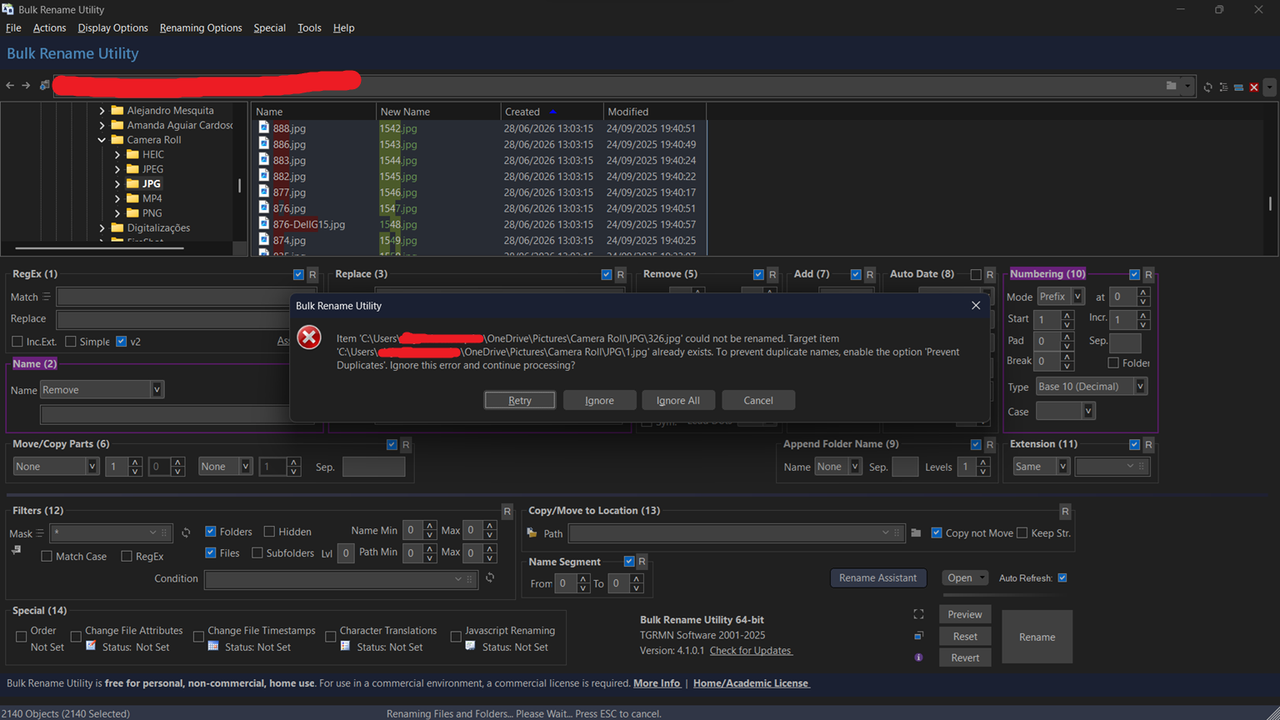
However, when I try to do it, this error happens. How can I fix it?

Image
gatineomansineo
 
Posts: 2
Joined: Sat Jun 27, 2026 8:25 pm

Re: How to rename 3122 file from "1" to "3122" based on the data

Postby TheGhost78 » Mon Jun 29, 2026 9:02 pm

Two issues here:

1) Renaming Options: tick Rename in Reverse Order.

2) Your screenshot shows that the date Created is the same for all files, so is that really the correct one to be sorting by? The date Modified column shows different date/times per file, so that looks like it should be the one you sort on.

Did you try Date Taken, as mentioned in my first response?
Last edited by TheGhost78 on Mon Jun 29, 2026 9:09 pm, edited 1 time in total.
TheGhost78
 
Posts: 267
Joined: Fri Jul 19, 2024 11:25 am

Re: How to rename 3122 file from "1" to "3122" based on the data

Postby TheGhost78 » Mon Jun 29, 2026 9:06 pm

If you want to definitely avoid errors with duplicate names, add a prefix of "ZZZZ" or something like that, and then you can remove that prefix afterwards with another rename.
TheGhost78
 
Posts: 267
Joined: Fri Jul 19, 2024 11:25 am

Re: How to rename 3122 file from "1" to "3122" based on the data

Postby Admin » Mon Jun 29, 2026 11:55 pm

This could be useful: show custom column with exif date taken and sort

1) Enable EXIF / file properties
- From the Renaming menu enable "Extract Windows File Properties" (so Item Date is available).
- Note: EXIF dates are only available for JPG/JPEG, TIFF, NEF, CR2; other file types will show blank.

2) Set up the Custom Column
- Menu: Display Options -> List
- In the Custom Column text box enter one of these tags:
- <(exif:DateTimeOriginal)> — shows the EXIF "Date Taken (Original)"
- or <(System.ItemDate)> — shows Windows "Item Date" (often the photo date)
- You can combine/format text, e.g. <(exif:DateTimeOriginal)> or use: Taken: <(exif:DateTimeOriginal)>

3) Show the column
- Click OK. The custom column will appear in the file list.

4) Sort by the custom column
- Click the custom column header to cycle Sort Ascending > Sort Descending > No Sort.
- The sort state is remembered between sessions.
Admin
Site Admin
 
Posts: 3182
Joined: Tue Mar 08, 2005 8:39 pm


Return to How-To