
I am trying to get the mediainfo .dll to work. I tried to follow the instructions. Not sure how to upload a PDF of the steps that I followed. If you give me a email address I can send that.
any advice that you can give me would be appreciated.
I am using a windows 11 machine
I copied the zipped DLLs into program files folder picture of the program file directory.
I closed BRU and reopened it then I did a right click on the .MOV file and got the following:
When selecting the .MOV file and I run Show List of File Properties I get the following:
When selecting the .HEIC file and I run Show List of File Properties I get the following
Running the mediainfo GUI I got this which shows a lot of metadata
problem with getting mediainfo to work.
6 posts • Page 1 of 1
problem with getting mediainfo to work.
 by sbennet1 » Tue Nov 11, 2025 11:11 am
- sbennet1
- Posts: 17
- Joined: Mon Oct 27, 2025 1:55 pm
Re: problem with getting mediainfo to work.
by sbennet1 » Tue Nov 11, 2025 11:17 am
FYI I am running bru form the bru folder under program files
- sbennet1
- Posts: 17
- Joined: Mon Oct 27, 2025 1:55 pm
Re: problem with getting mediainfo to work.
by sbennet1 » Tue Nov 11, 2025 11:29 am
copy of PDF on google drive
- sbennet1
- Posts: 17
- Joined: Mon Oct 27, 2025 1:55 pm
Re: problem with getting mediainfo to work.
by therube » Tue Nov 11, 2025 8:31 pm
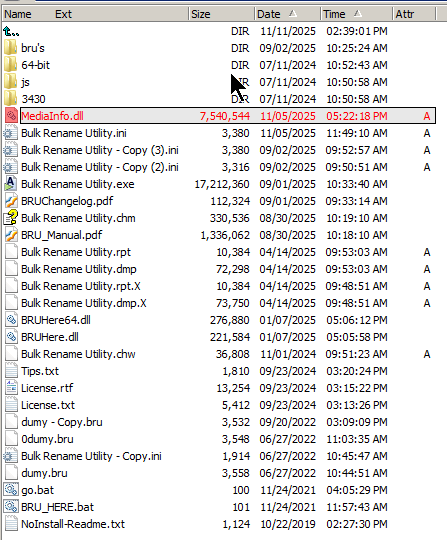
I copied the zipped DLLs into program files folder picture of the program file directory.
That should be, copy the DLL's into BRU's program directory.
(So a place like c:/program files/Bulk Rename Utility/, or where ever BRU is installed.)
- Confirm the MediaInfo DLL is copied into the Bulk Rename Utility program folder and BRU has been restarted. (If MediaInfo tags are available you can also see them in the right-click > List of File Properties dialog.)
viewtopic.php?f=12&t=7269
- therube
- Posts: 1494
- Joined: Mon Jan 18, 2016 6:23 pm
Re: problem with getting mediainfo to work.
by sbennet1 » Tue Nov 11, 2025 8:52 pm
That should be, copy the DLL's into BRU's program directory.
(So a place like c:/program files/Bulk Rename Utility/, or where ever BRU is installed.)
thank you. It now works. Should have thought of that myself.
- sbennet1
- Posts: 17
- Joined: Mon Oct 27, 2025 1:55 pm
Re: problem with getting mediainfo to work.
by UnanimousD » Tue Jan 13, 2026 1:46 pm
For anyone who used GOOGLE to find the instructions only to end up here on this thread saying "I tried to follow the instructions."
Go to this page https://www.bulkrenameutility.co.uk/dll.php and download the file.
(That URL is in the user manual, which is listed in the FAQ page
FAQ https://www.bulkrenameutility.co.uk/Faq.php
Manual https://www.s3.tgrmn.com/bru4/BRU_Manual.pdf )
The zip file contains install.txt which are the actual instructions. For the record, you just need to copy those files to wherever BRU is installed (probably "C:\Program Files\Bulk Rename Utility" but there's a small chance that might be different for you ).
When you've been the person actually answering the tech support line as many decades as I have, you get used to how people make mistakes and require hand-holding for what to others seems painfully obvious. Charles Darwin will forgive me.
Go to this page https://www.bulkrenameutility.co.uk/dll.php and download the file.
(That URL is in the user manual, which is listed in the FAQ page
FAQ https://www.bulkrenameutility.co.uk/Faq.php
Manual https://www.s3.tgrmn.com/bru4/BRU_Manual.pdf )
The zip file contains install.txt which are the actual instructions. For the record, you just need to copy those files to wherever BRU is installed (probably "C:\Program Files\Bulk Rename Utility" but there's a small chance that might be different for you ).
When you've been the person actually answering the tech support line as many decades as I have, you get used to how people make mistakes and require hand-holding for what to others seems painfully obvious. Charles Darwin will forgive me.
- UnanimousD
- Posts: 2
- Joined: Thu Mar 09, 2023 4:58 am
6 posts • Page 1 of 1